Posts

Final Presentation - Game reviews

Today was final presentations for everyones game projects. In order for this to go successfully we had to set out a time at the start of today so everyone can go around and see each project. There were good projects though out the class with a load of work done between the groups. The first project that I had the chance to look at was "Tiny Farm". This was a game created for children in order for them to learn how to count etc. The graphic and functionality of the game was excellent and the use of sound and voices once the characters were clicked on, made the game more interactive and unique. The second game I saw was "Monster" this was a jigsaw game created by Rob. It was a 3 level game created for kids with autism. The colours used were specifically picked in order to relax and not aggravate the eye of kids. The functionality and design was really well done and the intention even better. The next game I saw was "alien twine game". Its a choose your...

Continuation of project - MD2FINALGDD

This week we met up as a whole group to discuss our projects. We did this infront of the rest of the year and showed them our progress. We were open to feedback and questions and helped explain where we were going from there. My part in the project now is to help out anyone i can and be here for reference is anyone is stuck on information about the rising etc.

Finished Timeline - The 1916 Rising (MD2FINAL GDD)

Image
This week i completed my part on the research on the first day of the rising. I finished the timeline of the first day of events that took place in Dublin on Monday the 24th of April 1916.  In order to finish this timeline, i continued to search for an accurate website that i could trust and find complete facts on the rising.  I found one and was able to resort to facts and times that can give our designers and writers an insight into what they need to focus on so we can have the most accurate set and scripts for the game. I completed over two pages of timeline information with accurate times and places and also added one or two famous sayings that were said on banners when the rising first occurred in order to have them in the game. I also added more images to the PDF so everyone can see what they need to be drawing and imitating so we get an accurate account for the game. Once i completed my timeline, i sent in on to Chis, Ellen and Siobhan as i said i would in order f...

Research - Day1 of rising

Image
This past week we have created and doubled down on the work for this project. My job within this project is to help research the correct information and facts about the 1916 Rising. At the start of the week, i was unsure of where i stood within the research part of this project. I was unable to fully start as i didn't know the exact details of the project, for example if i was to research the whole rising, only the last few days or the events leading up to the rising. On Wednesday of this week, our group got together in order to finalise roles within the project and to discuss any problems or issues we had about what we were to do or who was on our mini teams. During the meeting i was able to find out what my main role was and how to go about it and who to go about it with. My research is to based on the first day of the 1916 rising. For this i've started to research the events that had occurred on the first day of the rising in the town where our character is from. It al...

Final Draft

Image
In this blog post, it will discuss all the annotated blogs that i have researched for my project for this module. The project i am working on for this module is an interactive learning game based in VR. It will be used to educate people on the story of The 1916 Rising. The following will show the benefits  of games and assistive technologies in education and life. Grace Oakley wrote about "Engaging students in inclusive Literacy learning with Technology". One of the main methods that Grace Oakley discusses is the assistive learning technologies that can help children with learning disabilities. By creating and establishing learning technologies as a beneficial technique teachers and parents will be able to help "literacy learners in attaining reading comprehension, fluency and motivation". Grace Oakley discusses a technology called "BEE-BOT". This technology assists children with extreme learning disabilities. It allows children to create sentences and s...

Annotated bibliography 2

The following Bibliographies show the history of interactive story telling and how to best research for your gaming project. I followed the mind map from "Interactive storytelling" to "Theory" to "History". I also research articles on technology that help people as our game will be used to help kids learn what happened in 1916 and teach older generations what it was really like. 1.  Ian Yeoman ,  Una McMahon‐Beattie , (2015)  "Trends: cyborg games",  Journal of Tourism Futures , Vol. 1 Issue: 1, pp.74-77,  https://doi.org/10.1108/JTF-12-2014-0019 In this article, Yeoman and McMahon-Beattie discuss the possibilities of cyborgs becoming one with all man kind. Due to the advancements of technologies recently, the outcomes for technology are endless. The use of prosthetic limbs controlled my muscle and nerve memory is already in place in this world eg the parolympics. Although "cyborg games" does not have much relevancy to our project, ...

1916 Project Brainstorm

I'm part of the large group working on the 1916 game experience. I am part of the writing team and i am the Researcher for the group.  Niamh: Researcher - Assists Ellen on punctuation and story writing. - Keeps in contact with Ellen regarding the story and plot of the game. - Gathers evidence regarding the 1916 rising. Who was involved, what characters should they be and based on what facts.

Beta - "Past the Limits"

Image
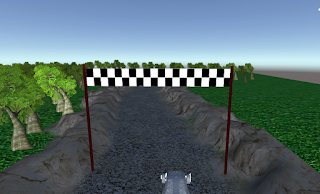
It has finally come to the point we have all been waiting for... THE GAME IS FINISHED. Im so happy o have completed my game "Past the Limits"... well i sort of completed it. I was able to to do the main parts that i was aiming for but due to the time shortage i had, i wasn't able to add a title screen and extra tracks. My game went vert well i think and i'm very happy with the outcome. It's a very enjoyable game to play. I added the second player and created waypoints for the opponent to follow in order to have an actual competition. Throughout this module there has been stressful times. especially tiring to remember to do the blog posts and weekend work on time while trying to balance the 100 other assignments we'd get at once. It definitely wasn't easy at all but we got there in the ned, we survived. For the most part minus the assignments, i found this module really enjoyable. I like following tutorials and seeing how games are made. i enjoyed being...

Unity Free Tutorials

Image
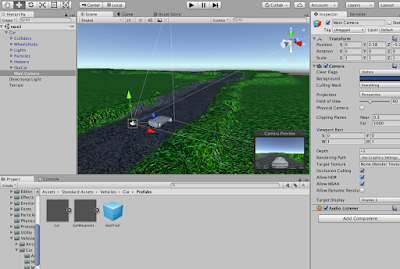
This week i found and watched tutorials on how to create and add an opponent to my game using a waypoint system. By adding the other car, The player can now fully see what the game will look like in the end and fully get a feel for the overall look of the game. When i first added the second car into the game, it only went around in circles so i had to change a few settings on it. I then started to add trackers on to the course which will tell the AI car where to go when it passes through them. In order to create the trackers for the car, i added cubes along the track and then wrote a script that will then tell the AI car to go to these points on the course. In order for it to work i then had to drag the script onto the mark01 cube which will then allow all cubes/ trackers to work. In the next tutorial i hope to add colour to both cars and hopefully add a opening title screen which will show the game name and which levels there are. "AI Car" https://www.youtube.com/watc...

Unity Free Tutorials

Image
In this weeks unity tutorials i continued on with the tutorials i was watching last week. This week i set up a finish and start line for the game. This will allow the players to identify what lap they are on and i will have it timed in with the overall stats and places on the board. I also added a lap time in the top right hand corner of the game. Under it i also added a best time feature. This will allow the players to try beat their best time and improve on their skills on the game. I want to combine these times and have them hooked up so they count up in real time. It will allow the players to try their opponents and try get a better time for the game and that level. Personal image of "Past the Limit"

First Playable

Image
This week i have been working on my game, especially the first playable version of "Past the Limit". Since the prototype last week I've updated my terrain and how the cameras work in my game.  In my terrain i've updated the walls surrounding the track to make it look like the player is driving in a rocky area and have also added a bunch of trees to the game to make it seem more like the country side that i was aiming for.  Currently the camera has been set to follow the car and no longer tumble and flip whenever the car hits the wall or flips over.  The car runs smoothly. Adding colour and enemies is still needed in my game and i have not yet completed that task. I'm still trying to fix the audio on my game. For the first playable game its at a good point and i will continue to work on it till i complete the full game. "Personal image from "Past the Limit"

Week 8 Progress

Image
Over the past 8 weeks now i have been working towards where i am now with my game and where am i want to be in a few weeks. At the start of the semester myself and my classmates made a schedule to stick to in order to complete the assignments on time to have our game up and running on time. I'm going to be honest with you right now, i haven't stuck to the schedule at all. Out of the 8 weeks i've been uploading these assignments and posting on the blog, i've stuck to the schedule once or twice. I've never been good at sticking to "study timetables". I don't dedicate enough time to them and thats my own fault, but saying that i've uploaded 97% of these assignments on time so i'm not doing too bad. I am happy with where my game is and how its developing but i still haven't figured out why there is no sound on my car (Tune in next week for the continuation of me complaining that theres no sound).  I like how my terrain is developing and where...

Week 8 Comments and Feedback

Image
Over the past 8 weeks or so myself and my classmates have been giving each other feedback through blog comments on each others post. We'd either have informal comments or would use techniques such as TAG or WWW. For anyone who is reading this and is wondering "What in the hell is TAG and WWW?" ill let you in on a secret to get the best comments and feedback to others. TAG stands for Tell, Ask, Give. Tell the person what you like, ask questions about what they've said and give them some pointers on how they can improve. WWW stands for Wow, Wonder, What if. Let them know if they achieved any wow moments in their post. Wonder - ask questions if you're not sure about how something will work etc. What if - make suggestions on how to improve or change their game which will help them improve the best quality of game. For me personally, i've really liked these types of strategies to give and take in feedback that my classmates have given me throughout the weeks. The...

Week 8 Reading and Writing

Image
Over the past 8 weeks i've been reading and writing about articles that range from improving your learning mindset to the mechanics, dynamics and aesthetics framework. Over these weeks i've learned many new techniques and ways to work that i hope will benefit me in the future, in work and just in life in general. Overall the readings have been a good thing in my opinion. they made myself and others start to remember what reading is like, especially when you find a good reading that intrigues your mind and thoughts. My favourite reading so far was "Growth mindset". I found this to be my favourite reading over the weeks as it though me many things about myself and how i deal with work and development processes. Since this reading i've been trying to employ this mindset into my daily life. With projects recently i've been trying to push myself more to gather as much and work as hard as i can throughout the process as it will allow me to get the grade i'm ai...

Prototype

Image
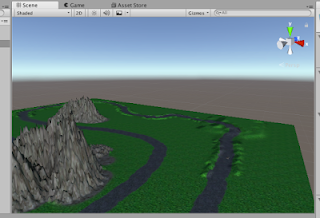
"Personal image of "Past the Limits" This week I started to make my game "Past the Limit". I'm not going to lie, i dint want to at first but once i got into building the terrain i started to enjoy creating this other world and racing game. So far i've built the terrain and added some features to it, in order to create a realistic and exciting environment for the game. What worked? So far most things have worked for me. The tutorials i'm following are very descriptive and helpful and allow me to really get into the designing and functionality of the game. Ive been able to add textures to my game and create the ground and track for the game. Ive also added rocky mountains in order to create an exciting/fascinating race course for "Past the limit". I've also added the main race car to the game. This will allow me to test the track as i continue to develop the game. "Past the Limits" terrain What didn't work? ...

Unity Free tutorials

Image
This week i looked at tutorials based around my game "Past the Limits". I watched the first two tutorials on car racing games by Jimmy Vegas. The first tutorial covered  "The Basics"  of creating a car racing game and the second tutorial covered  "Textures and Car imports" . This allowed us to import real looking cars and making them drive. It gave me an overview of what the game will go like.  The first tutorial was rather simple as a good few of the things covered in this video i had seen and learnt from the other tutorials when i first started learning unity and how to implement and design the scenery and how to create dips and bumps in the terrain. Jimmy Vegas also showed us how to use the camera and how to click into the game. It was a good refresher in the basics.  The second tutorial was also quite simple and also included parts that i had already seen and learnt from the previous tutorials. In this tutorial, i was show how to import text...

Final GDD

Image
This week I finalised most of my GDD in order for it to be easier for people to understand where i want to go with my game "Past the Limit". "My GDD" Here is the link to my  DunDoc .

Unity Tutorial 06

Image
In this weeks tutorials, I learned how to create wind and fix lighting, fade screens and create a more realistic looking environment eg. Adding a house.  As these tutorials develop during the weeks, ive become more invested into them which i know will come to benefit when developing my game fully and adding the key elements and design. In the first tutorial of this week we are shown how to add a skybox. By adding a skybox we can manipulate the sky and colouring of the game depending on the type of mood you want to set in your game. This is very helpful if you want your game to take place at dusk or dawn. It'll add atmosphere to your game. Jimmy Vegas also shows us how to create a wind zone that will give the game a more realistic look to our game and how to pick a speed that will allow for realism but also wont let it get warped by the speed. In the second tutorial Jimmy Vegas showed us how to create Fade screens in our game. This will allow for a better looking game when creat...

Game Decisions

Image
This week i read an article that talked about how productivity applications can learn from games. The article was called  "Building a Princess saving app"  . In this weeks reading, we dived into the process and importance of decision making within a game.  What i found the biggest help while reading this article was the steps you may need to consider in order to create a cozy game and by steps i mean the "ingredients" of cozy aesthetics. The ingredients for cosy aesthetics are as follows: 1. Abundance - food/warmth 2. Smooth transitions  3. Protection and support - environment or characters 4. Focus - eliminations of interruption 5. Familiar setting 6. Refuge and escape  7. Welcome entity   8. Seasons  9. Ritual - repeating actions. Id you make the decision to have these cozy aesthetics in your game, it will allow a player to reframe their mindset, relax and continue with the game. It gives comfort to the player and i pers...

Game Design Document

Image
For the Game Design Document we used a website called "Dundoc". It was a very handy website to use as it defined each section and separated them into categories which made it a bit easier to do. The Game Design Document is a highly descriptive document of the design for the video game. Even though the dundoc gave us the template, it was still quite hard to know what to write. most of it was written then and there and many will have to be added and removed throughout the process. I wasn't sure on a good few of them and i hope that will change throughout the process. "My Dundoc page" https://www.dundoc.com/project/4780